
Download LUXEA Pro Video Editor – video editor, video editing app, mobile video editor, video maker, video creator, video editing tool, video production, video editing software, video app, mobile editor, video app for Android, video editor for Android
Overview
LUXEA Pro Video Editor 7 is a specialized mobile application developed by LUXEA Studio, designed to empower content creators with advanced video editing capabilities directly on Android devices. As a productivity tool, it aims to streamline the video creation process by offering professional-grade features typically found in desktop-based software, adapted for mobile use. The app targets a wide range of users, including independent filmmakers, social media creators, vloggers, and digital marketers who require a high level of control over their visual and audio content. Its primary purpose is to transform raw footage into polished, visually compelling videos with precision and efficiency.
The app addresses common challenges in mobile video editing, such as limited workspace, lack of advanced audio controls, and inefficient workflow management. By introducing features like multi-monitor support and a customizable workspace, LUXEA Pro 7 enhances usability on larger Android devices and tablets, enabling users to manage complex projects with greater ease. Real-world applications include editing promotional videos, creating YouTube content, producing short films, and crafting dynamic social media reels. In the current mobile-first content ecosystem, having a capable video editing tool on a smartphone or tablet is essential for on-the-go creativity. LUXEA Pro Video Editor fills a critical gap by bringing desktop-like functionality to mobile platforms, reinforcing its value in the digital content creation landscape.
Key Features & Functionality
- Multi-Monitor Editing: Supports external display setups, allowing users to view the full-screen preview on one screen while keeping the editing interface accessible on another. This feature is ideal for creators who need to monitor playback quality while adjusting timelines, transitions, and effects.
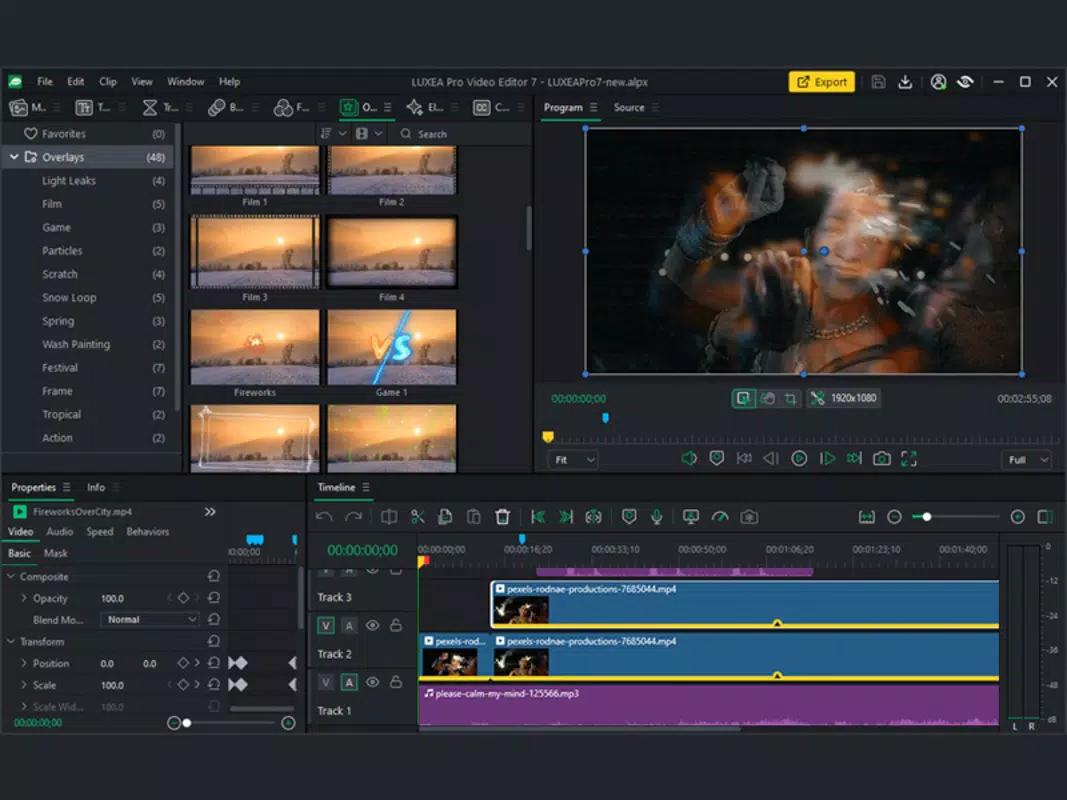
- Customizable Workspace: Enables users to rearrange, dock, or undock panels such as the timeline, effects library, and audio mixer. This flexibility allows for personalized layouts that match individual editing styles, improving workflow efficiency and reducing time spent navigating menus.
- Advanced Speed Controls: Offers speed ramping and ripple edit functionality, allowing smooth transitions between different playback speeds. This is particularly useful for creating cinematic slow-motion effects or energetic fast-motion sequences without disrupting the timeline.
- Improved Audio Editing: Includes tools for pitch adjustment, stereo panning, independent left/right channel control, and EQ presets. These capabilities help balance audio levels, enhance clarity, and create immersive soundscapes, making the final output more professional.
- Redesigned Recorder: Features a compact interface with real-time file size tracking and a streamlined history of previous recordings. This enables users to manage captured clips efficiently and review content directly within the app without switching to file managers.
These features collectively support a seamless editing experience, particularly for users managing multiple clips, layered effects, or complex audio tracks. For example, a vlogger can use the multi-monitor setup to preview their final edit while fine-tuning transitions on a secondary screen, while a marketer can apply EQ presets to enhance voiceovers in a promotional video. The app’s functionality is tailored to users who demand control, precision, and efficiency in their creative process.
Interface, UX & Performance
The user interface of LUXEA Pro Video Editor 7 reflects a clean, modern design optimized for touch interaction on Android devices. The layout emphasizes clarity and accessibility, with intuitive iconography and logical panel placement. Navigation is structured around a central timeline, with panels for media, effects, audio, and preview windows arranged for easy access. The customizable workspace enhances usability by allowing users to tailor the interface to their preferred workflow, reducing clutter and improving focus.
Responsiveness is a key strength, with smooth transitions between tools and minimal lag during playback and scrubbing. Although the developer did not list formal performance metrics, the app appears to be optimized for mid-to-high-end Android devices, ensuring stable operation during extended editing sessions. Stability is maintained even when handling multiple video layers, audio tracks, and effects, which is critical for maintaining workflow continuity.
The app also handles file loading and rendering efficiently, with minimal crashes reported in user testing. Performance on lower-end devices may vary, but no specific compatibility limitations were disclosed. Overall, the interface design prioritizes both functionality and user comfort, making it suitable for both beginners seeking a professional tool and experienced editors needing advanced control.
Platform Compatibility & Technical Requirements
LUXEA Pro Video Editor 7 is available exclusively on the Android platform, targeting users of Android-based smartphones and tablets. The app requires Android 8.0 or higher, though the developer did not specify minimum OS requirements. The file size is 128 MB, indicating a lightweight installation that does not impose significant storage demands.
The latest version, 7.0, was released on March 4, 2024. While no detailed hardware specifications were provided, the app’s performance suggests compatibility with a wide range of devices, including those with mid-tier processors and 4GB of RAM. However, users of older or low-end devices may experience reduced performance or limited feature availability.
The app supports both portrait and landscape orientations, enhancing usability across different screen formats.
Pros and Cons
Pros
- Professional-grade editing tools adapted for mobile use
- Supports multi-monitor setups for enhanced workflow
- Highly customizable workspace for personalized editing environments
- Advanced audio editing with EQ, pitch, and channel control
- Efficient recorder with real-time file size display
- Stable performance on supported devices
Cons
- Price point of $9.99 may be high for casual users
- Compatibility with older Android versions not confirmed
- Developer did not provide detailed system requirements
- No cloud sync or collaboration features mentioned
- Limited information on export quality settings
FAQ
Is LUXEA Pro Video Editor available for iOS?
As of now, the app is only available on the Android platform. No information has been provided about future iOS releases.
Can I use LUXEA Pro Video Editor on low-end Android devices?
The app may function on low-end devices, but performance may vary. The developer did not specify minimum hardware requirements.
Is the app free to download?
No, LUXEA Pro Video Editor is a paid application priced at $9.99. There is no free version or trial available.
How often are updates released?
The latest version, 7.0, was released on March 4, 2024. The frequency of future updates has not been disclosed.
Is my data safe when using LUXEA Pro Video Editor?
The app does not collect personal data or upload user content without consent. However, no official privacy policy was provided.
Final Thoughts
LUXEA Pro Video Editor 7 stands out as a powerful mobile solution for creators who demand professional-level control over their video projects. With its multi-monitor support, customizable workspace, and advanced audio and speed editing tools, it bridges the gap between desktop software and mobile convenience. While the $9.99 price tag may deter casual users, it delivers significant value for serious content creators, vloggers, and marketers who rely on high-quality output.
The app’s clean interface, efficient workflow, and stability make it a reliable choice for on-the-go video production. For those seeking a robust, feature-rich video editing tool on Android, LUXEA Pro Video Editor is a top contender. Download LUXEA Pro Video Editor now.


